8. Ask The Model Why
Page: Perturbation Lab · Goal: find out which part of a genome a trained model relies on, by editing that genome in silico and watching the prediction move.
Needs a trained run (step 7), the [genotype] extra, and an AlphaGenome backend
(step 9).
Load a model and an individual
Pick a run and a checkpoint and click Load model. You can also open a run from the Experiments page with Perturbation Lab. The lab scores individuals through the run's own window processing and saved normalization (its processed cache must still exist). Choose an individual (its true class and split are shown) and a gene among the run's windows.
Edit, re-predict, re-score
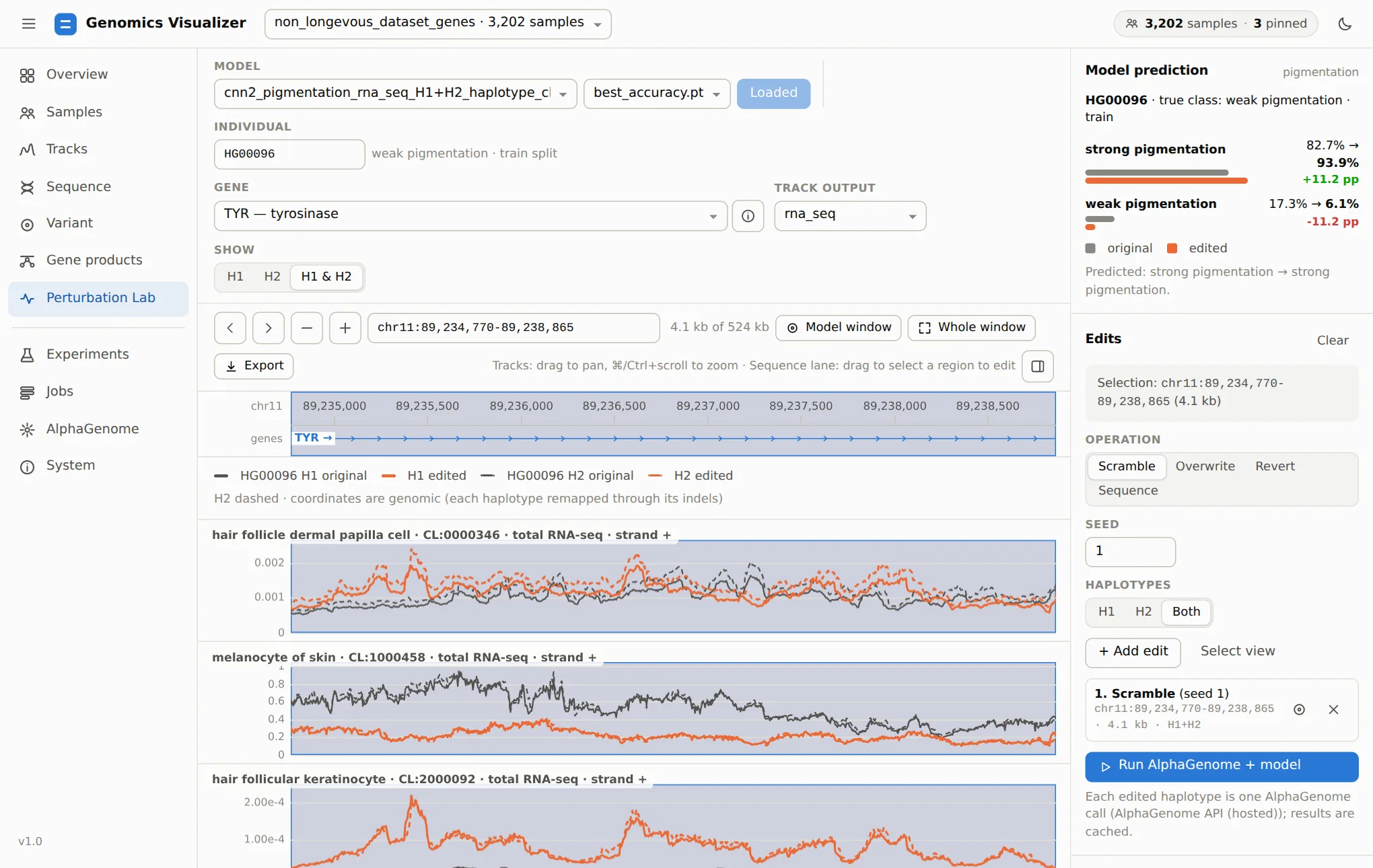
- Select a region: drag on the sequence lane, or zoom to it and click Select view.
-
Choose an operation and the haplotypes (H1, H2, both), then click + Add edit. Several edits can be combined.
Operation Effect Scramble Shuffle the region's bases (seeded): keeps the composition, destroys motifs Overwrite Every base becomes A, C, G, T or N Revert Bases aligned to the reference return to it: removes the individual's SNVs (indels stay) Sequence Replace the region with your own sequence of the same length -
Run AlphaGenome + model re-predicts each edited haplotype (one AlphaGenome call each, cached by sequence), rebuilds the model input and shows every class probability before → after.
Edits keep each haplotype's length, so the edited predictions line up base for base with the originals. Selections are on the genomic axis and reach each haplotype through its own indels. In the example, scrambling 4.1 kb of TYR lowers the predicted melanocyte RNA-seq over it, and the model's strong pigmentation probability rises by 11 points. The edit matters to the model, and the direction tells you which class that stretch's signal supports.
Gaps in the tracks
The blank stretch in the tracks is not missing data. Both of HG00096's copies carry a structural deletion that starts there (chr11:89,231,317, see step 6), and in genomic coordinates deleted bases are drawn as gaps.
Revert is the most useful operation for causal questions. Reverting a region to the reference asks how much of the prediction comes from this individual's variants there. Reverting a single SNV asks what that variant alone does. That is the per-base complement of the cohort association on the Variant page.
Saturation scan
Instead of guessing where to edit, let the lab try every window:
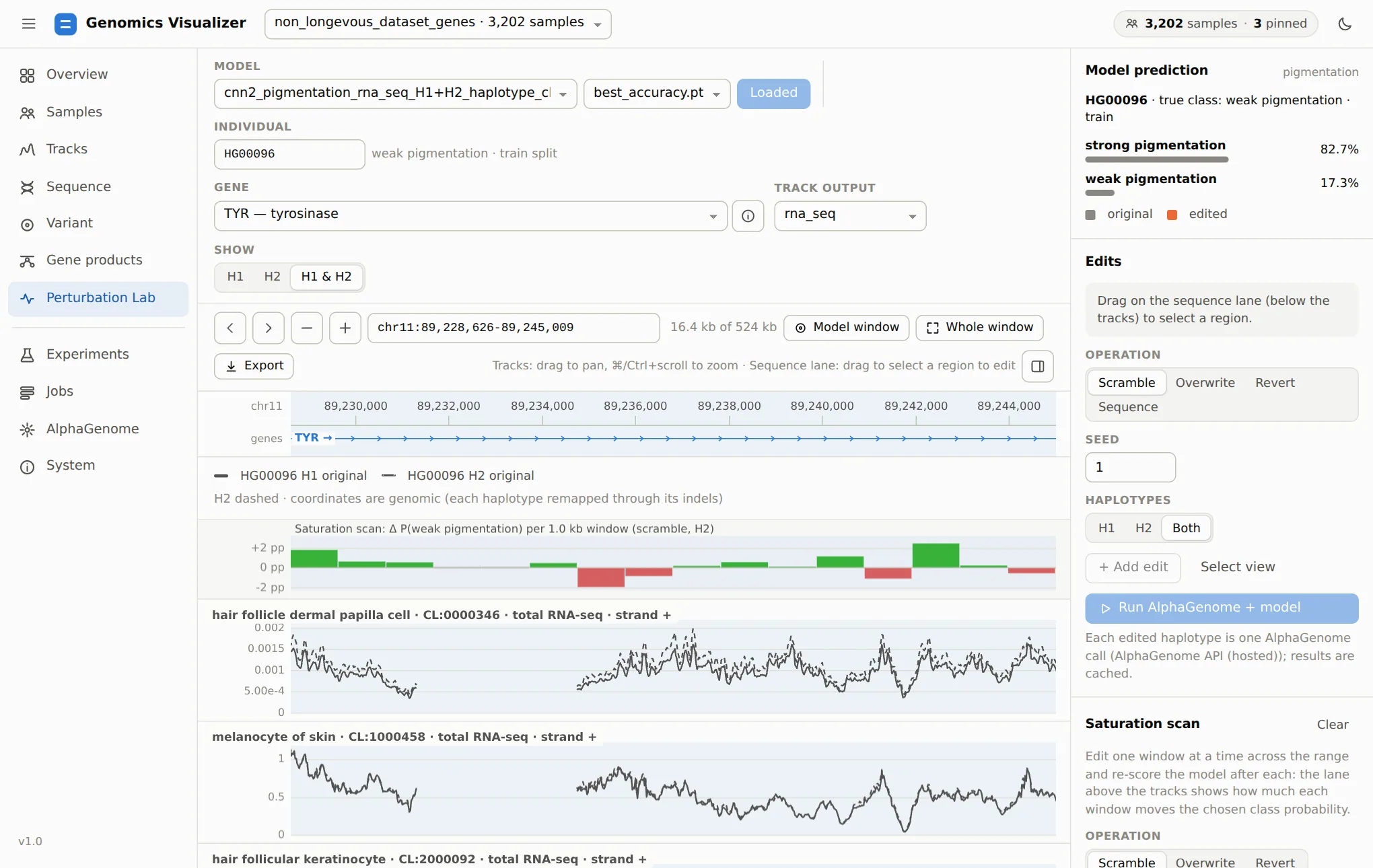
The Saturation scan section slides one edit (scramble, overwrite or revert) across the model window, the view or the selection. You set the window size and step (step = window gives tiled windows, a smaller step gives overlapping ones) and the haplotypes. The scan runs as a background job of at most 256 windows, each one AlphaGenome call per edited haplotype. Windows where the edit changes nothing, such as reverting a stretch without variants, are skipped. The list beside it ranks the windows with the largest effect. Show zooms to one, and + adds it as an edit so Run shows its tracks. Download TSV saves every window.
Here no single kilobase moves the prediction by more than about 3 points, so no sharp element in this stretch drives the call. A model that relied on a few causal sites would show a few tall, isolated bars. A flat profile like this one points to signal spread across the window, which is also what you would expect if the model had learned ancestry, as step 2 warns.